
Working capital analysis with the monthly detail buyers actually negotiate on
ZAF Tools builds the NWC schedule at monthly granularity, calculates DSO, DIO, DPO and cash conversion cycle, shows reported max, min and swing, and reconciles each month back to the balance sheet.
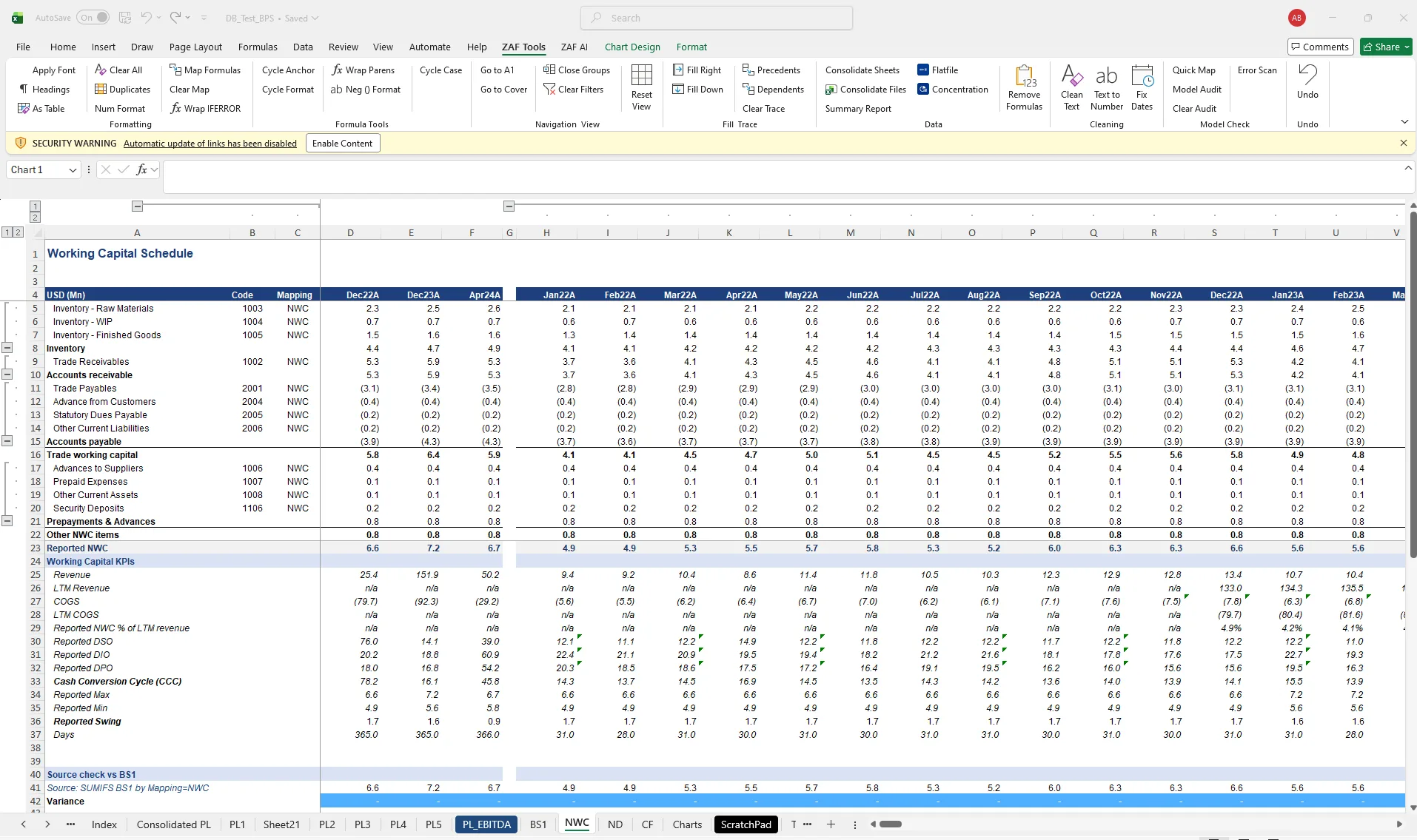
The NWC peg is where deals are won or lost, and it is usually supported by a schedule someone built at 2am. Seasonality gets missed, non-trade items get lumped in, and the reconciliation to the balance sheet is an afterthought.
- Monthly NWC schedule with trade and other splits
- DSO, DIO, DPO, cash conversion cycle
- Reported max, min and swing
- Net debt and debt-like items schedule
How it works
- NWC items are identified from the mapping (trade, other, non-trade).
- Monthly schedule is built with KPIs per month and per period.
- Source check compares each month to the balance sheet.
- Analyse Working Capital drafts commentary on trends, seasonality and peg considerations.
Questions about working capital & net debt
Does it calculate an NWC peg?
It builds the LTM average and seasonality views that support a peg; the final number remains the deal team’s call.
Related
- Quality of Earnings — Normalise EBITDA and trace every adjustment to source, inside the databook.
- Build financial statements — From mapped TB to P&L, balance sheet, NWC, net debt and cash flow schedules.
- FDD commentary & export — Commentary beside the schedule, partner-grade rewrite, export to Word and PowerPoint.
- Net Debt and Debt-like Items — template
- AR Ageing Schedule — template
- ZAF Tools vs cloud QoE platforms
See it on your own trial balance
Book a 30-minute live demo on your own trial balance, or request a trial for your team.