
Financial statements built from the trial balance, not retyped from a PDF
Run Full FDD takes a mapped trial balance and produces the databook: P&L, balance sheet, net working capital, net debt and cash flow schedules with KPIs, monthly and annual views, and source checks back to the TB on every sheet.
Databooks are assembled by hand, one SUMIFS at a time. Monthly views drift from annual views. A late TB means rebuilding half the file.
- P&L, BS, NWC, net debt and cash flow schedules
- Monthly and annual views with LTM
- KPIs and ratios (DSO, DIO, DPO, cash conversion)
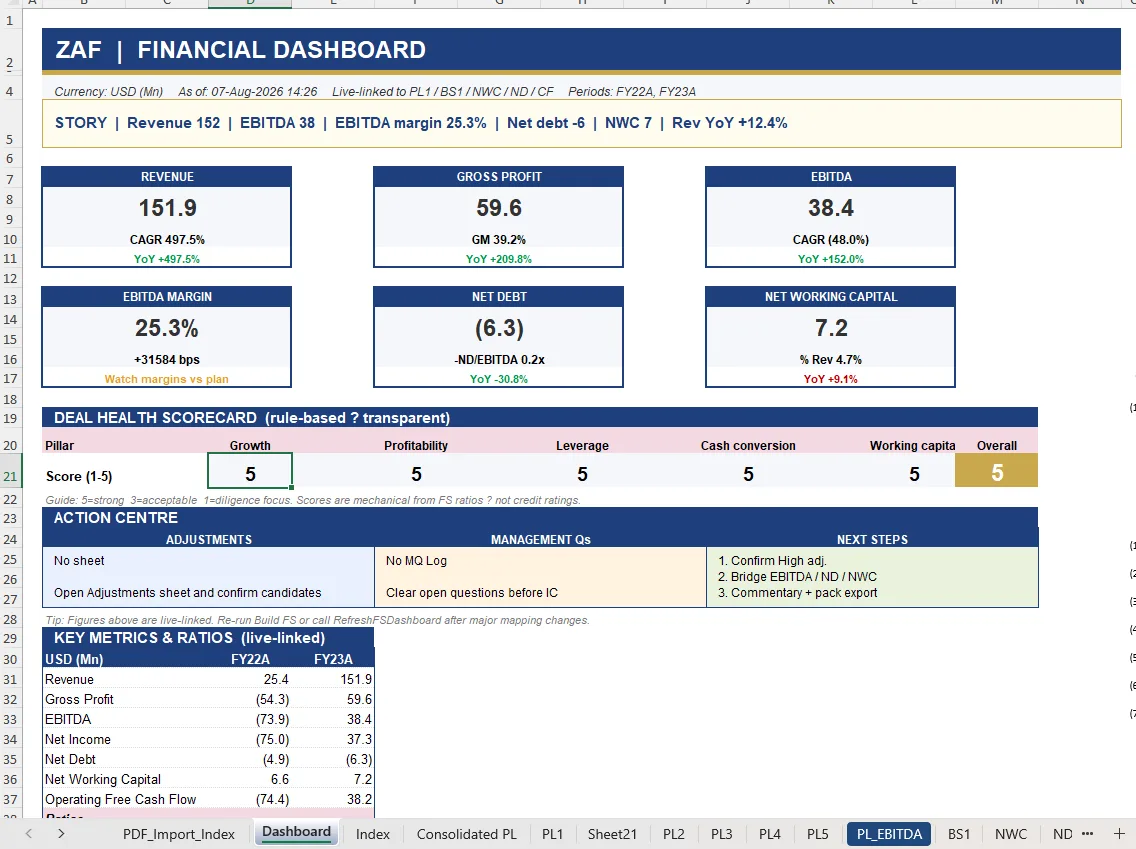
- Financial dashboard with scorecard and action centre
How it works
- Set the style theme or capture your firm’s House Style once.
- Run Full FDD builds every statement from the mapped TB.
- Update TB adds a later period and refreshes every schedule.
- The dashboard summarises revenue, EBITDA, margin, net debt and NWC with a rule-based deal health scorecard.
Questions about build financial statements
Are the outputs formulas or values?
Formulas. Every schedule is live-linked to the mapped TB so reviewers can trace any number.
Can I mask client data before sending externally?
Yes. Data Masking replaces entity names and identifiers before export.
Related
- EBITDA Bridge — Period-to-period bridge with waterfall chart and a cross-check to the P&L.
- Trial balance mapping — Import any TB, translate it, and let AI suggest the mapping to your hierarchy.
- Working capital & net debt — Monthly NWC, DSO/DIO/DPO, seasonality and net debt schedules.
- Trial balance mapping template — template
- Financial due diligence checklist — template
- ZAF Tools vs Daloopa
See it on your own trial balance
Book a 30-minute live demo on your own trial balance, or request a trial for your team.