
EBITDA bridge, built and tied out in one click
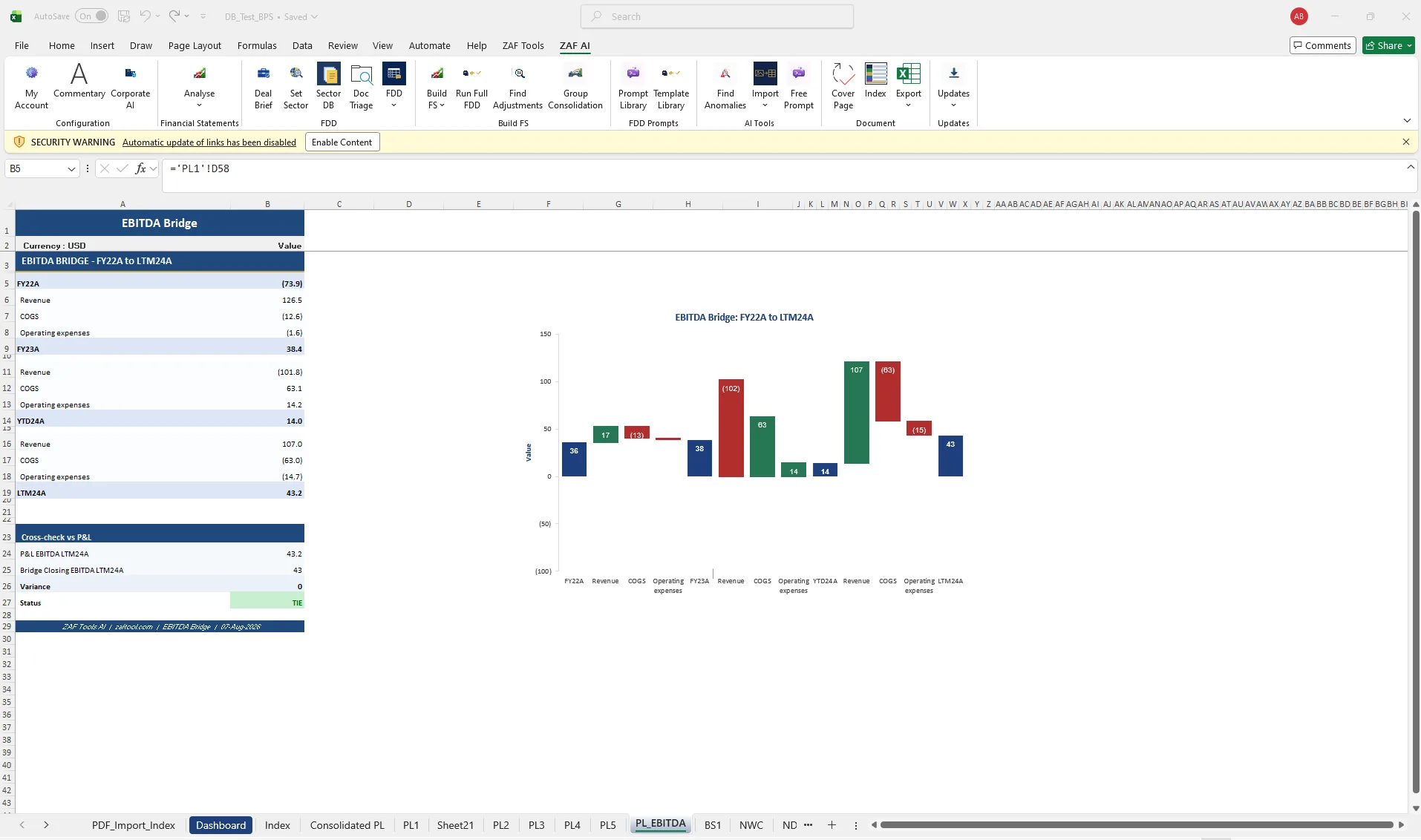
Select the periods, and ZAF Tools builds the bridge schedule, decomposes the movement into revenue, cost of sales and operating expense drivers, draws the waterfall and adds a cross-check line so the closing EBITDA reconciles to the P&L to the decimal.
Bridges are rebuilt on every deal, usually from a template someone made years ago. They break when periods change, the chart needs manual relabelling, and nobody checks the closing figure against the P&L until the partner does.
- Bridge schedule with drivers per period
- Waterfall chart, labelled and formatted
- Cross-check to P&L with variance
- Optional commentary on the main movements
How it works
- Choose the opening and closing periods (FY, YTD or LTM).
- ZAF reads the mapped P&L and calculates each driver’s contribution.
- The bridge schedule and waterfall chart are written to a new sheet in your house style.
- A cross-check row compares bridge closing EBITDA to the P&L and shows TIE or the variance.
Questions about ebitda bridge
Can I add my own bridge categories?
Yes. Drivers follow your mapping, so any grouping in your chart of accounts can become a bridge step.
Does it handle LTM and stub periods?
Yes. FY, YTD and LTM periods are all supported, including comparatives.
Related
- Quality of Earnings — Normalise EBITDA and trace every adjustment to source, inside the databook.
- Build financial statements — From mapped TB to P&L, balance sheet, NWC, net debt and cash flow schedules.
- Working capital & net debt — Monthly NWC, DSO/DIO/DPO, seasonality and net debt schedules.
- EBITDA bridge Excel template — template
- EV to Equity Bridge — template
- ZAF Tools vs Macabacus
See it on your own trial balance
Book a 30-minute live demo on your own trial balance, or request a trial for your team.