
Financial Due Diligence Software: A Buyer's Guide for Deal Teams (2026)
How to choose financial due diligence software: the five kinds of tool sold under the label, 10 criteria that matter, demo questions, and a free scorecard.
Financial due diligence software is any tool that speeds up the analysis of a target company’s historical financials, such as trial balance mapping, Quality of Earnings, working capital and net debt, or the evidence and reporting around that analysis.
That definition is broad on purpose, because the market is broad. Five quite different kinds of product get sold as “FDD software”, and most bad purchases I have seen came from comparing two tools that were never trying to do the same job. This guide is for the people who will actually use the tool: M&A boutiques, PE deal teams, transaction advisory and CA firms, and individual practitioners. It covers what the software should do, the five categories, ten criteria worth scoring, the questions to ask in a demo, and how to run a pilot before you sign anything.
What FDD software should actually do
Every buy-side FDD engagement goes through the same six stages: import the trial balances and management accounts, map each account to a reporting hierarchy, build the databook, analyse (QoE, EBITDA bridge, working capital, net debt), question management, and report. I have written about which of those stages can be automated separately, so here is the short version.
The hours go into the mechanical stages. Mapping a 1,500-line trial balance, rebuilding the balance sheet by month, and trawling the ledger for one-off items can easily take the first week of a three-week engagement. The judgement stages, such as deciding whether an adjustment is supportable, what the peg should be, or how to word a finding, take less time but carry all the risk.
So the rule for buying is simple. Buy software for the mechanical stages and keep the judgement with the reviewer. A tool that takes the judgement away from the reviewer, or hides it in a platform the reviewer does not open, creates review risk in exchange for speed.
The five kinds of tool sold as “FDD software”
| Category | What it does | Examples | Good for |
|---|---|---|---|
| Excel FDD add-ins | TB import, mapping, databook build, QoE, bridge and NWC inside Excel | ZAF Tools | Teams whose deliverable is an Excel databook |
| Cloud AI QoE platforms | Take in a data room and return a draft QoE or FDD report | Finsider, Keye, PinpointAI | Teams with budget for a first draft from documents |
| Document tie-out tools | Pull figures from PDFs into Excel with a link back to the source | DataSnipper | Audit-style evidence and tie-outs |
| Productivity and linking suites | Formatting, model audit, Excel-to-PowerPoint linking | Macabacus, UpSlide | Pitchbooks and presentation-heavy work |
| Public-company data | Supply public-company financials from filings | Daloopa | Equity research, not private-company FDD |
A few notes on the categories:
Excel FDD add-ins work where the databook already lives. The output is formulas in your workbook, so review works the way it always has. ZAF Tools is in this category.
Cloud AI QoE platforms such as Finsider, Keye and PinpointAI are the newest category. They produce impressive first drafts from raw documents, but the work moves out of Excel into a web platform, and pricing is typically $25K+ per year or per engagement. See ZAF Tools vs cloud AI QoE platforms.
Document tie-out tools such as DataSnipper are built for auditors. They snip figures from PDFs into Excel with a link to the source page, which is excellent for evidence but stops before the analysis. See ZAF Tools vs DataSnipper.
Productivity suites such as Macabacus and UpSlide make bankers faster at formatting and linking decks, but they do not map a trial balance or build a QoE. See vs Macabacus and vs UpSlide.
Public-company data tools such as Daloopa maintain databases of filings. A private target has no filings, only a trial balance and a data room (see ZAF Tools vs Daloopa).
The important point is that categories 3 to 5 complement an FDD tool rather than replace one. Plenty of firms run a tie-out tool and an FDD add-in side by side. Compare tools within a category first, and only then decide which categories you need.
Ten criteria that matter
These are the criteria in the scorecard below, roughly in the order a reviewer would care about them.
1. Where the work happens. Is the output in your Excel databook, or in a web report you then copy from? Reviewers review in Excel. Every copy-paste out of a platform is a step that can break.
2. Traceability. Pick any adjusted EBITDA figure. Can you click back through the formulas to the trial balance line it came from? A number with a “source: p. 14” footnote is not the same as a live formula.
3. Input handling. Real inputs are messy: TBs exported with merged cells, general ledgers with 400,000 rows, audited accounts as scanned PDFs, and trial balances in German or Swedish. Ask the vendor to use your files, not theirs.
4. Mapping. Does the tool map to a standard FDD hierarchy (P&L, balance sheet, NWC, net debt, cash flow)? Can you override a mapping and see every schedule update? Does it remember your mappings on the next deal? Our trial balance mapping page shows what that looks like in practice.
5. Reviewer control. Proposed adjustments should be accepted or rejected one at a time, with the reason recorded. “Edit the draft” is weaker than “approve each line”.
6. Analysis coverage. At a minimum: Quality of Earnings, the EBITDA bridge, working capital with the peg, net debt and debt-like items, and price-volume-mix. Check how deep each one goes, not just whether it appears on the feature list.
7. Output and house style. Does the databook come out in your firm’s format? Does commentary export to Word and PowerPoint, and does it read like your team wrote it?
8. Data security. What leaves the analyst’s machine, where it goes, and how long it is kept. For regulated clients, ask whether AI calls can be routed to your own cloud tenancy. Get the answer in writing.
9. Deployment. Is the installer signed? Will IT approve it without a month of security review? Does it run on the platform your team actually uses?
10. Pricing model. Per user, per engagement or enterprise contract. Model the cost on your real volume, for example five users and twelve deals a year, rather than on the headline price.
Use a scorecard, and fill it in during the demo
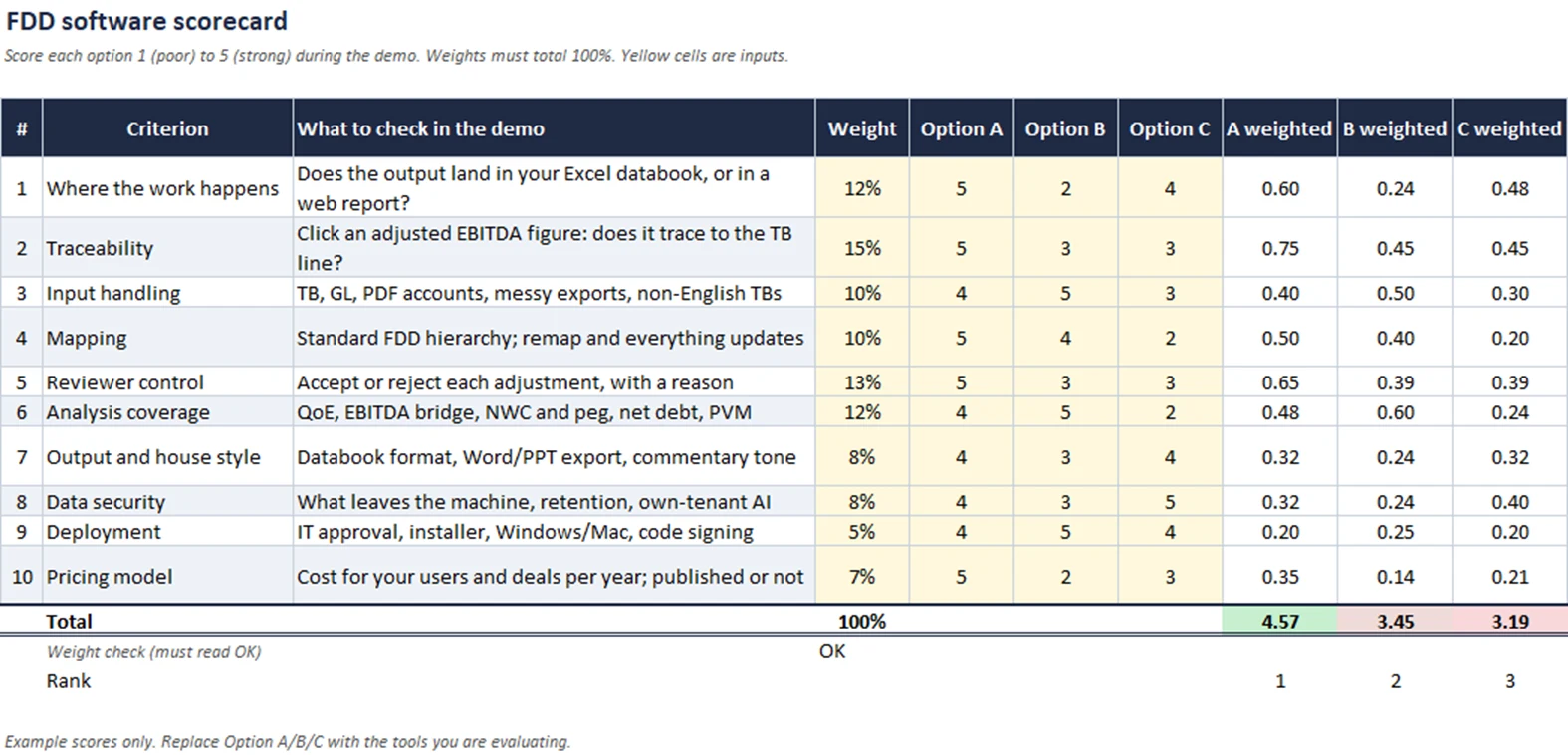
The scorecard above is a plain Excel sheet. It has ten criteria, a weight for each, scores from 1 to 5 for up to three options, and a weighted total with a check that the weights add up to 100%. The scores shown are examples only. Replace Option A, B and C with the tools you are evaluating.
The weights shown suit a boutique or PE deal team whose output is a databook. They put the most weight on traceability (15%), reviewer control (13%) and where the work happens (12%), and the least on deployment (5%). If you are a large firm with a central IT team, move weight from pricing to security and deployment. If you are a solo practitioner, do the opposite.
One practical tip: score during the demo, not afterwards. Demos blur together within a day, and the most polished demo tends to win if you score from memory.
Questions to ask in every demo
These questions show you how a tool works, rather than how it looks:
- “Show me one adjustment all the way from source to the adjusted EBITDA cell.” This tests traceability and reviewer control in one step.
- “Here is a 1,500-line trial balance in German. Map it.” Bring your own anonymised file. Vendor sample data is always clean.
- “I’m changing this account from other creditors to accruals. Show me what updates.” Everything downstream should update, including NWC, net debt and the commentary.
- “What leaves my machine, where does it go, and how long is it kept?”
- “What would this cost for our users and deal volume?” If the answer is “let’s set up a call”, note that on the scorecard.
- “What doesn’t it do?” A vendor who cannot answer this either does not know the product or is not being straight with you.
Red flags: a demo run only on the vendor’s own data, no way to get the analysis into Excel, adjustments you can edit but not trace, and pricing that changes depending on how the call is going.
Run a pilot on a closed deal
The only benchmark that counts is your own work. Take an engagement you have already closed and re-run the build with the tool:
- One analyst, one reviewer, two weeks. Keep it small enough to finish.
- Time the build, from raw TB to a reviewed databook, and compare it with the original engagement’s hours.
- Compare the outputs. Adjusted EBITDA, closing NWC and net debt should reconcile to what you signed off. Any difference is either a tool error or a finding you missed, and both are worth knowing.
- Count review comments. Faster is only better if the reviewer raises no more points than before.
Use our financial due diligence checklist to scope the pilot so the tool is tested across every area, not just the P&L.
Where ZAF Tools fits, and where it doesn’t
ZAF Tools is an Excel add-in. It imports and maps the trial balance (including translating TBs in seven languages in the table), builds the financial statements, and runs Quality of Earnings, the EBITDA bridge and working capital analysis. It drafts management questions and commentary, and exports them to Word. Every figure stays a formula in your workbook, and adjustments are accepted one at a time. The result is 80% less time on the Excel build. Pricing is published: Solo is $29 per user per month, Pro is $189 per month for a five-seat team, and the Enterprise plan can route AI calls to your own Azure tenancy. Details are on the pricing page.
It fits teams whose deliverable is an Excel databook: boutiques, PE deal teams, CA firms and independent practitioners who want the analysis automated without leaving Excel.
It is not the right tool if you want a finished report from a data room with no Excel work, if your team works on Mac, or if your need is audit evidence rather than transaction analysis (a tie-out tool fits that better).
FAQ
What is financial due diligence software? It is a tool that speeds up the analysis of a target’s historical financials (trial balance mapping, Quality of Earnings, working capital, net debt) or the evidence and reporting around that analysis. It ranges from Excel add-ins to cloud platforms.
Can AI do a Quality of Earnings? AI can find candidate adjustments, build the schedules and draft commentary. Deciding which adjustments are supportable, and signing the report, still needs a practitioner.
Is Excel still the standard for FDD databooks? Yes. Buyers, lenders and reviewers expect an Excel databook they can trace and re-cut, which is why traceability to the workbook matters so much when choosing a tool.
How much does FDD software cost? It depends on the pricing model. Excel add-ins are typically priced per user per month, while cloud QoE platforms and enterprise suites are usually annual contracts through a sales team. Model the cost on your real users and deal volume.
Book a demo
If your team builds FDD databooks in Excel, the fastest way to test ZAF Tools against this scorecard is a live demo on your own anonymised trial balance. Book a demo.
About the author. Abhishek Bhandari is a financial due diligence practitioner with 15+ years in FDD and M&A advisory at EY and Grant Thornton, working on Nordic and DACH mandates. He founded ZAF Tools to automate the parts of an FDD engagement that do not need a human, and Zion Advisor, an offshore FDD and Quality of Earnings practice.